Release Notes
SenseCraft HMI v1.4.0 Release Notes
Section titled “SenseCraft HMI v1.4.0 Release Notes”Release time: 2026.04.10
This release was split across two weeks (last week + today). Sorry for no heads-up last time. Going forward, we’re opening up our dev roadmap and collecting feedback in a public doc.
Designer Updates
Section titled “Designer Updates”Weather Widget
Section titled “Weather Widget”- New parameters: Date, Daily Average Temperature, Weather Code in Text, and many more
- Unit settings: now you can choose which temperature/speed/rain sum units to display
- Configuration UI redesigned: selected parameters now appear as grouped elements, with chart previews for numeric parameters. However, you can still stick to the original “Available Field” to select the parameters
- Added 4 preset widgets: Current Weather, Compact Weather Card, 7-Day Forecast, 5-Day Forecast with Date
Calendar Widget
Section titled “Calendar Widget”- Added “Week starts on” setting – choose Sunday or Monday
Timezone Optimization
Section titled “Timezone Optimization”- Timezone handling for Date/Time/Clock/Calendar/Day Counter Widgets switched from UTC to IANA-based (includes daylight saving natively)
Other Improvements
Section titled “Other Improvements”- Draw Widget moved from Top Toolbar to Basic Widgets, now supports stroke and pattern settings
- Multi-component logic inside Groups improved
- Inspector Panel heavily trimmed: only the most essential settings remain. Cleaner, less overwhelming
SenseCraft HMI Core
Section titled “SenseCraft HMI Core”- Sidebar secondary menus now expand on hover – more room for the canvas designer
- Sidebar now has the SenseCraft HMI icon logo at the top
- Homepage added a banner section for important news and updates
- Workspace now shows Add New, My Page, My Playlist all on one page – cleaner entry points
- My Page aggregates all Designs and uploaded Images. Edit icon in top-right enables batch actions (Apply to Device, Delete)
- Clicking +New gives two options: create a Design from scratch, or upload photos to make an Album
- Choosing +Design from scratch now guides you through naming your design and selecting the target device screen size
- Firmware Flasher and Image Dithering tools got a UI refresh
- Each tool now includes a description, when to use it, and helpful tips
New Hardware Support
Section titled “New Hardware Support”- Added support for 10.3” 16-grayscale ePaper Display reTerminal E1003
Roadmap & Feedback Channels
Section titled “Roadmap & Feedback Channels”To better manage releases and collect community feedback, we’re now sharing our development roadmap in a public Google Doc called SenseCraft HMI Open Roadmap.
If you have feature requests or run into issues, you can:
- Leave a comment directly in the Google Doc (we’ll review regularly)
- Or reach out on SenseCraft HMI Discord channel as we also pull feedback from there and update the doc
Thanks as always for your support! 💚 SenseCraft HMI Team
SenseCraft HMI v1.3.2 Release Notes
Section titled “SenseCraft HMI v1.3.2 Release Notes”Update time: 2026.02.28
🚀 New Features
- Component Widgets: hosts widgets of Calendar, Clock, List, Table, and Data Chart
- Data Chart Widgets: New chart components supporting line, bar, candlestick, scatter, pie charts, and gauges — optimized for visualization of SenseCAP historical data, stock market, and your any other data
- HTML & RSS Redesign: Now integrated as widgets within Canvas Editor’s Data Widgets section
- HTML Widget supports both web URL embedding and local HTML file upload/rendering
- RSS Widget seamlessly embeds RSS feeds as an element into your canvas
🐛 Bugs Fixed & Improvements
- Calendar Widget: Optimized table styling and interaction logic
- Flip Clock Widget:
- Preview and Apply to Device now reflect user’s timezone customizations
- Fixed component disappearance issue after resizing
- Google Calendar Widget: Fixed timezone display issue (addressed in v1.3.1)
- Auto-save Enhancement: Designs are now automatically saved when users click Apply, Preview, Publish, or Private Share (located in Dev Tool) — no manual save needed
- My Page Updates: Now displays all Canvas Designs by default (including all past Design, RSS, and Web HTML pages). User-uploaded Image pages can be accessed via the dropdown menu in the top-right corner
- SenseCraft HMI Homepage Featured:
- Added social metrics (views, likes, no. of add-to-my page) to the Featured Banner
- New “Featured” Category showcasing all previously featured designs
- Device Support Updates: Added the 13.3” EINK Spectra full-color displays reTerminal E1004 and XIAO EE02 DIY ePaper Kit to homepage and device setup pages with product info and links
🌟 Get Involved Try the new release and share your feedback! Report bugs, suggest new features, and help shape our roadmap on Discord: https://discord.com/invite/Jj2CBXCjtf
SenseCraft HMI v1.3.0 Release Notes
Section titled “SenseCraft HMI v1.3.0 Release Notes”Update time: 2026.01.30
🚀 Toward a UI Template Community This release transforms SenseCraft HMI into a collaborative platform. Now you can publish, discover, and reuse UI templates built by the community in a more collaborative way.
-
Redesigned Homepage
- Featured Templates spotlight outstanding designs.
- Filter templates by category using the new top navigation bar.
- Updated Footer includes quick links to Change Logs, About, Support, and more.
-
Publish Pages as Public Templates
- A new “Publish” button is available on the pages.
- Submit your page with a picture, title, category, and description—once approved, it becomes a public template.
- Track submission status (Under Review, Published, or Rejected) in your User Profile Center (click the user avatar on the Side Bar to access).
-
Enhanced User Profiles
- Customize your public profile with an avatar, bio, and social links.
-
Community Feedback & Workflow
- Browse, like, and directly “Add to My Pages” any published template.
- Your feedback helps creators and improves the template ecosystem.
🐛 Bugs Fixed & Improvements
- 4‑Level Grayscale Support Update: Fixed for reTerminal E1001–E1004 with the new firmware V1.1.1. → Update firmware directly via the Tools Bar in SenseCraft HMI.
- Google Calendar Timezone: Resolved synchronization issues across different time zones.
- Platform Version Visibility: Find the current version in the Release Notes icon (above Doc Center on the Side Bar) or in the Change Logs (footer).
🌟 Get Involved
- Share Your Designs: Publish your best pages as public templates and inspire the community. Outstanding templates will be featured on the homepage banner!
- Join the Conversation: Report bugs, share feedback, and help shape our roadmap on Discord.
SenseCraft HMI v1.2.6 Release Notes
Section titled “SenseCraft HMI v1.2.6 Release Notes”Update time: 2026.01.19
Canvas Designer Improvements
- Shortcuts & Right-Click Menu for faster editing:
Ctrl+C: CopyCtrl+V: PasteCtrl+X: CutCtrl+D: DuplicateCtrl+Z: UndoCtrl+B: Toggle bold textCtrl+I: Toggle italic text
- Right-click any element to open a contextual menu (Copy, Duplicate, Layer, Group, Add to My Widgets)
- New Basic Elements: Clock (Analog & Flip), Calendar, List, and Table
- Enhanced Data Integration:
- Google Calendar (verified, multiple event types supported)
- Layout improvements for Todoist, Reddit, and HackerNews
- Updated UI design application process in the Canvas
- Group Function Upgrade:
- Synchronized resizing for all components within a group
- Batch property editing for similar components (e.g., text color, size, weight)
- Text Element Enhancements:
- Customizable background color, padding, and shadow styles
- Adaptive selection box and automatic line wrap during drag-and-drop
- Canvas Zoom Optimization:
- Finer zoom control for detailed adjustments and improved usability
New Hardware Support
- reTerminal E1003 (10.3″ Monochrome),launching soon
- reTerminal E1004 (13.3″ Spectra Full Color),launching soon
- EE02 Dev Kit with 13.3″ Spectra Full Color Display
Other Updates
- Restored advanced developer tools for UI config JSON import/export
- Added Page Duplicate feature in My Pages
Get Involved Report bugs and help shape our roadmap by joining our Discord community #sensecraft-hmi!
SenseCraft HMI v1.2.0 Release Notes
Section titled “SenseCraft HMI v1.2.0 Release Notes”Update time: 2025.12.25
Highlights
- New Homepage with Rich Templates – Ready-to-use designs for weather, calendars, crypto, stocks, quotes, and more.
- New Architecture – Design your UI before hardware arrives. The platform now clearly separates Workspace (design), Device (deployment), Tools and AI Gen (Beta).
- Expanded Data Sources – Live integration with ZenQuotes, Google Calendar, CoinMarketCap, Todoist, and others.
- Modern Redesign – Refreshed UI across the entire platform.
- New Hardware – TRMNL 7.5” (OG) DIY Kit support.
- Always-On Mode – New Always-On display mode with faster response.
- Third-Party Authentication- Support for Google and GitHub login apart from the oringinal SenseCraft email login
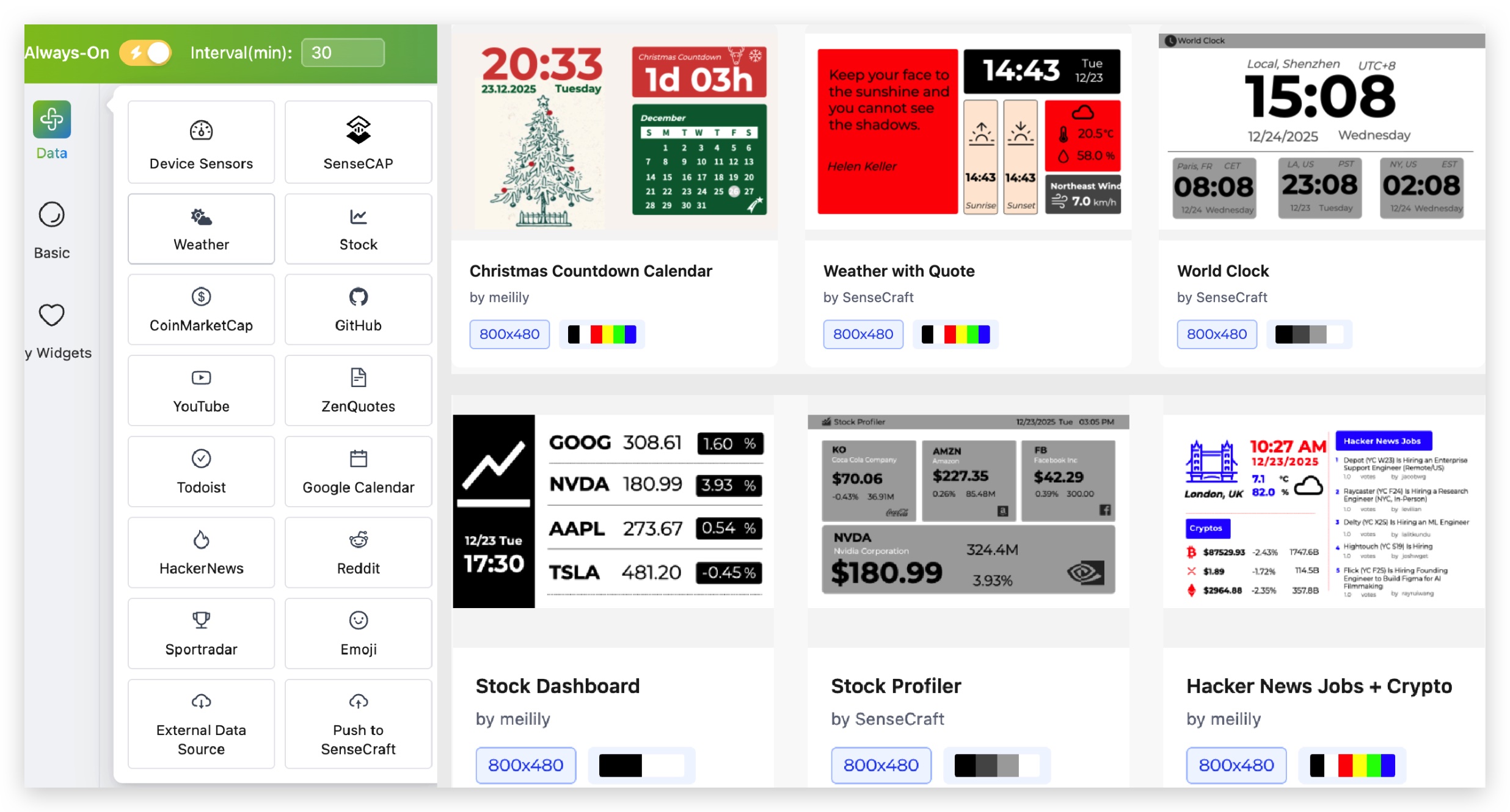
New Platform Layout
- Home – Browse templates and apply your favorites to your canvas
- Workspace – Design UI pages and playlists
- Device – Manage connected devices
- Tools – Firmware Flasher, image dithering
- AI Gen (Beta) – AI-powered image and layout generation
Improvements
- Improved 4-level grayscale dithering (2.9” displays)
- Fixed pairing code issue (XIAO EE04)
- Smoother canvas rotation
- Better preview rendering
Get Involved
Join our Discord to vote on templates, report bugs, and help shape our roadmap.
Discord Channel: https://discord.com/invite/Jj2CBXCjtf
🎄 Merry Christmas!
🧑🎄 Team SenseCraft HMI
SenseCraft HMI v1.1.0 Release Notes
Section titled “SenseCraft HMI v1.1.0 Release Notes”Update time: 2025.11.20
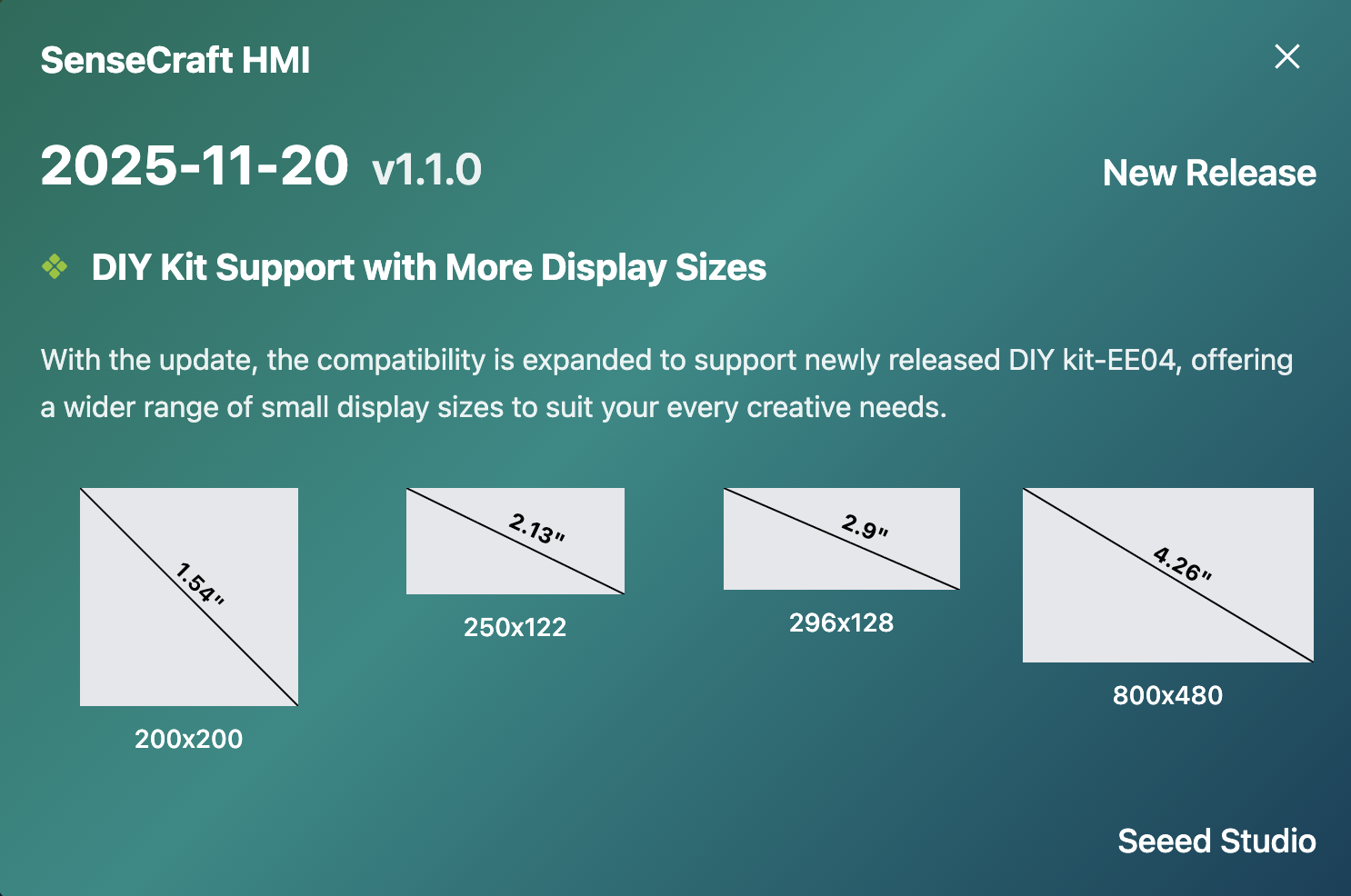
New: XIAO EE04 ePaper DIY Kit Support (ESP32-S3)
We’ve expanded compatibility to support the newly released EE04 DIY Kit, offering a wider range of ePaper displays (1.54” to 7.5”) for your creative projects.
Supported Display Types: • Monochrome (black & white) • 4-color displays • 6-color displays (E Ink Spectra 6 Full-color)
SenseCraft HMI v1.0 Release Notes
Section titled “SenseCraft HMI v1.0 Release Notes”Update time: 2025.10.24
Re-Designed Layout & Pagelist for Easier Creation
- New UI layout for easier navigation
- Add pagelist feature, create multiple UIs like keynotes slides
- Add page libraries, save all your UIs
Enhanced UI Editor and Data Integration
- Support for both horizontal and vertical canvas layouts
- Support UI template import and export
- Directly pull live SenseCAP data from your account
- Add device last online time and next refresh time
Expanded Hardware Support
- Support ePaper DIY Kit-EE04, compatible with 7.3” and 7.5” displays
- Support TRMNL 7.5” (OG) DIY Kit with 7.5” display
Firmware Flash and Image Processing Tool Page
- Supports flashing both SenseCraft HMI firmware and TRMNL firmware
- Add dithering tool to process image and export directly to x.c files
SenseCraft HMI v0.6 Release Notes
Section titled “SenseCraft HMI v0.6 Release Notes”Update time: 2025.9.23
Initial Release
- Device support: reTerminal E1001 and E1002
- Page types: Individual gallery, canvas, RSS, and web page support
- Firmware management: Online firmware flashing and updates
For more detailed information about each feature, please refer to the corresponding guide sections.